Welcome to the first hands-on part of the Otter training! During the first part of the training you have seen the benefits of the new digital commerce api, and you have explored the concept of the cart centric approach
The goal of the following short exercises is to be able to get familiar with the basic procedure to create an order through the digital commerce API. For this we will work through some basic steps that are needed to create a booking:
- Retrieval of air bounds
- Creation of a traveler
- Creation of a cart
- Creation of an order
Setup
In order to start coding you will need to clone the typescript-sdk-playground from https://dev.azure.com/AmadeusDigitalAirline/DES-SDKs/_git/typescript-dxapi-playground
Click on ‘clone', and copy the url
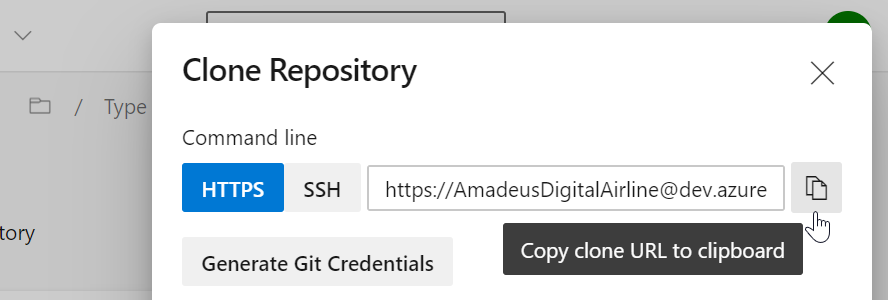
Open a command line in the directory you wish to copy the files
git clone https://dev.azure.com/AmadeusDigitalAirline/DES-SDKs/_git/typescript-dxapi-playground
cd typescript-dxapi-playground
yarn install
yarn start
Note : In case you have some timeouts during the installation, as a work-around you can specify an option to yarn :
yarn install --network-timeout 120000
Open your browser and navigate to http://localhost:3020/ open your console (F12), and you should see the message: Welcome to the Digital API!!!
From now on we will use the console to check the output of our calls to the DxAPI. We have provided some of the code already, most notably an easy access to offers, cart and order APIs and some helper variables which you will reuse:
(async () => {
  // Initialize the digital API targeting DigitalForAirlines gateway.
  const gatewayAddress = 'https://test.airlines.api.amadeus.com/v1/security/oauth2';
  const gatewayPlugin = createAmadeusGatewayTokenRequest({
    gatewayUrl: gatewayAddress,
    gatewayClientId: 'CQZddrc7RFTBmG6Hbl7pQTyiPtHUuOAq',
    gatewayClientPrivate: 'NaeP7dKAgV2emuvi'
  });
  const clientFactsPlugin = new ClientFactsRequestPlugin({
    initialGlobalFacts: {
      corporateCodes: '000001'
    }
  });
  const client = new ApiFetchClient({
    basePath: 'https://test.airlines.api.amadeus.com/v2',
    requestPlugins: [gatewayPlugin, clientFactsPlugin, new SessionIdRequest()]
  });
  const api = {
    airBoundApi: new AirBoundApi(client),
    cartApi: new CartApi(client),
    orderApi: new OrderApi(client)
  };

  // Some data to accelerate building your calls
  const millisecondsInADay = 24 * 3600 * 1000;
  const tomorrow = new utils.DateTime(new Date().setHours(0, 0, 0, 0) + millisecondsInADay);
  const commercialFareFamilies = ['ECONOMY', 'BUSINESS'];
})();
If you are not familiar with the concept of async/await for promises you can check: https://javascript.info/async-await
You are all set to start the exercise!
The goal of the exercise is to:
- Explore the airBoundApi and use DxAPI to search for flights from LHR to CDG departing tomorrow and returning 5 days later.
- Log the number of offers returned.
In order to do this you will need to create a return date first
const returnDate = new utils.DateTime(new Date().setHours(0, 0, 0, 0) + 6 * millisecondsInADay);
Create a variable offers and call the api.airBoundApi.airBoundsShopping to retrieve some offers. If you installed all the recommended extensions for this training in VSCode you should be able to use the autocomplete feature to explore the API and check what kind of object the airShopping call is expecting.
Finally, show the offers in the console:
const offers = ...
console.info(`Great! We have received ${offers.data.airBoundGroups.length} offers!`);
Solution
// Feel free to play with origin/destination codes
const offers = await api.airBoundApi.airBoundsShopping({
  airBoundsInputs: {
    itineraries: [{
      departureDateTime: tomorrow,
      originLocationCode: 'LHR',
      destinationLocationCode: 'CDG',
      isRequestedBound: true
    }, {
      departureDateTime: returnDate,
      originLocationCode: 'CDG',
      destinationLocationCode: 'LHR'
    }],
    commercialFareFamilies: commercialFareFamilies
  }
});
The goal of the exercise is to explore the offers you retrieved in the previous exercise:
- Retrieve the first offer in the list.
- Log it's ID
- Explore SDK helpers of AirBounds to get and log its price.
Solution
const offer = offers.data.airBoundGroups[0].airBounds[0];
console.info(`Offer ID: ${offer.airBoundId}`);
const price = getTotalPrice(offer.prices);
console.info(`Offer's price: ${getFormattedTotal(price)} ${price.currencyCode} (${price.currency.name})`);
During this exercise we start to look at the cart centric approach. You will need to create a cart using the createCart function from the cartApi. Remember it's an async function, so you will need to await for the promise to resolve.
const cart = await api.cartApi...
- Retrieve the air bounds availability for your return flight (you only did it for the outbound). TIP: Check the selectedBoundId property in your airBoundsShopping input model
- Explore cartApi and use DxAPI to create a new cart with the outbound and inbound offers
- From the response:
- log the cart ID
- log the IDs of travelers that were added to the cart
- log the IDs of offers that were added to the cart.
Solution
const inboundOffers = await api.airBoundApi.airBoundsShopping({
  airBoundsInputs: {
    itineraries: [{
      departureDateTime: tomorrow,
      originLocationCode: 'LHR',
      destinationLocationCode: 'CDG'
    }, {
      departureDateTime: returnDate,
      originLocationCode: 'CDG',
      destinationLocationCode: 'LHR',
      isRequestedBound: true
    }],
    commercialFareFamilies: commercialFareFamilies,
    selectedBoundId: outboundOffers.data.airBoundGroups[0].airBounds[0].airBoundId
  }
});
console.info(`Great! We have received ${inboundOffers.data.airBoundGroups.length} offers for the inbound!`);

const cart = await api.cartApi.createCart({postCartBody: {airBoundIds: [
    outboundOffers.data.airBoundGroups[0].airBounds[0].airBoundId,
    inboundOffers.data.airBoundGroups[0].airBounds[0].airBoundId
  ]}});
  console.info(`Cart id: ${cart.data.id}`);
  console.info(`Travelers in the cart: ${cart.data.travelers.map((currentTraveler) => currentTraveler.id)}`);
  console.info(`Offer added to cart: ${cart.data.airOffers.map((offer) => offer.id)}`);
We will now update a traveler to our cart, to do this you will need to:
- Create a traveler using the model Traveler.
- Explore the cartApi and use DxAPI to update the traveler in your cart.
- Log the response
You can import traveler and name models from them from dapi sdk:
import {Name, Traveler} from '@dapi/sdk';
Solution
  const name: Name = {firstName: 'ETV', lastName: 'TEST', title: 'MR'};
  let traveler: Traveler = {passengerTypeCode: 'ADT', names: [name]};
  const travelerReply = await api.cartApi.patchTravelerInCart({cartId: cart.data.id, travelerId: cart.data.travelers[0].id, patchTravelerBody: traveler});
  console.info(`Pax added to the cart: `, travelerReply);
  traveler = travelerReply.data;
Add an email to the cart. You can import the model from @dapi/sdk just like you did with Name and Traveler.
import {Email} from '@dapi/sdk';
- Create a contact information using the model Email. Associate it to your traveler.
- Explore the cartApi and use DxAPI to add your contact to your cart.
- Log the response
Again remember that the cart api function to do this is asynchronous, so you will need to await for the promise to resolve.
Solution
  const email: Email = {purpose: 'standard', address: 'etv@etv.com', category: 'personal', contactType: 'Email', travelerIds: [traveler.id]};
  const contacts = await api.cartApi.createContactsInCart({cartId: cart.data.id, postContactsBody: [email]});
  console.info(`Contacts added to cart: `, contacts);
Once you have added an offer, a traveler, an email, we should be able to retrieve all our information to check it's correct. In order to do this you will have to:
- Explore the cartApi and use DxAPI to retrieve the whole content of your shopping cart.
- Log the response.
Tip: you will have to use the cart.data.id
Solution
  const updatedCart = await api.cartApi.retrieveCart({cartId: cart.data.id});
  console.info(`Cart with offer & passenger: `, updatedCart);
The last part of the exercise is to create an order, to do this you just need to use your cart and the orderApi.
- Explore the orderApi and use DxAPI to create an order from your cart.
- Log the response. (optional: log a PNR recap)
Solution
  const orders = await api.orderApi.createOrder({cartId: cart.data.id});
  console.info(`Order: `, orders[0]);
The SDK provides helper functions to retrieve information from orders, offers, the cart etc. These helpers are created to avoid code replication since they try to cover common usecases. Let's have a look of some of these frequent usecases that could be used in many different instances, and how this facilitates the development.
The goal of this exercise is to display if the previous Orders are paid (spoiler alert, they should not be)
- (bonus - Pay the first Order with the credit Visa card 4012999999999999)
TIP: You can use the isOrderPayed helper to check if orders are paid:
import {isOrderPayed} from '@dapi/sdk/helpers';
Also you can use the orderApi to create a payment record:
Solution
const isPaid = orders.data.every(isOrderPayed);
console.info(`orders are ${isPaid ? '' : 'not '}payed`);
const firstOrder = orders.data[0];
await api.orderApi.createPaymentRecords({
  orderId: firstOrder.id,
  createPaymentRecordsBody: {
    paymentRequests: [
      {
        paymentMethod: {
          paymentType: 'PaymentCard',
          vendorCode: 'VI',
          cardNumber: '4012999999999999',
          expiryDate: '0221',
          holderName: 'kilian',
          cvv: '123'
        } as PaymentCard
      }
    ]
  }
});
You have created a cart in exercise 3. This cart contains an offer. Try to display its total price (with the correct number of digits) TIP: you can use the getTotalAmount and getFormattedAmount helpers.
import {getFormattedAmount, getTotalAmount} from '@dapi/sdk/helpers';
Solution
  const offerAmount = getTotalAmount(cart.data.airOffers[0]);
  console.log(`total price: ${getFormattedAmount(amount)} ${amount.currencyCode}`);